Hi — my policy renews on the 18th. Can I get a quote?
@kabir.mehta9:38
Can I add my parents to my health cover?
Maya Chen9:30
Re: Claim CLM-2026-01234 — documents attached
Visitor · desktop9:12
What's the status of my claim?
Get a quote · web form8:57
Health · family floater · 3 members
Resolve
Contact matched
Channels merged
History attached
Route
Least-busy owner
SLA started
Molly drafting
One record
KKabir Mehta
SourceInstagram
InterestFamily floater
A
Ananya Rao
Person
Live
Channels
WhatsApp · Gmail
Owner
SSrinivas
Flow
Renewal → Quote
SLA
1h 52m left
Quote drafted — review & send
MMaya Chen
ClaimCLM-2026-01234
StatusDocuments in
Ananya Rao9:41
Hi — my policy renews on the 18th. Can I get a quote?
@kabir.mehta9:38
Can I add my parents to my health cover?
Maya Chen9:30
Re: Claim CLM-2026-01234 — documents attached
Resolve
Route
A
Ananya Rao
Person
Live
Channels
WhatsApp · Gmail
Owner
SSrinivas
Flow
Renewal → Quote
SLA
1h 52m left
Quote drafted — review & send
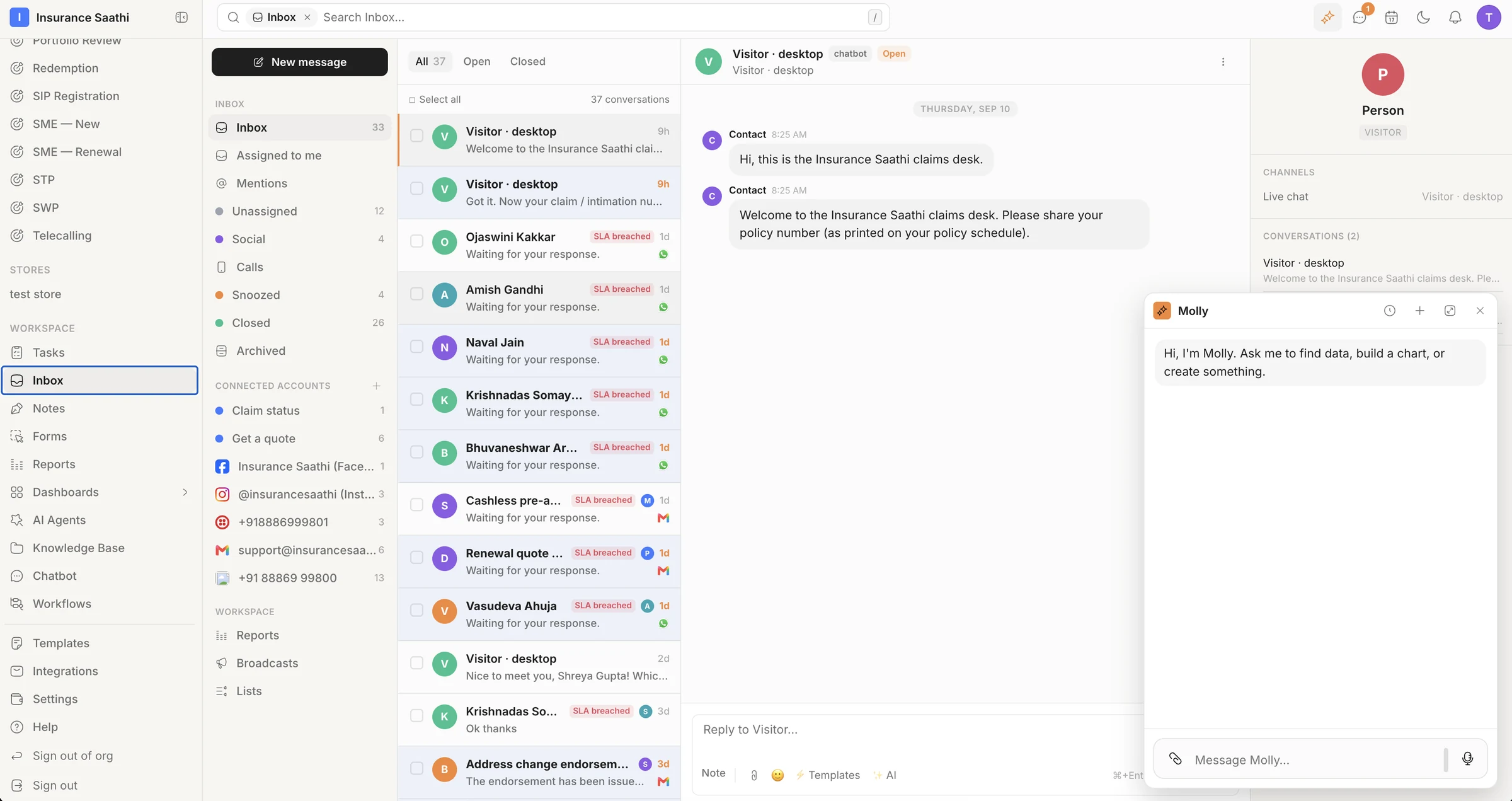
Enquiries from WhatsApp, Instagram, Gmail, a website chat and a web form flow into klerc, which matches them to one contact, routes them to the least-busy teammate, and produces a single customer record with an owner, a pipeline stage, an SLA timer and a reply drafted by Molly.
Works with the apps your clients already use
WhatsApp
Gmail
Outlook
Zoho Mail
Instagram
Facebook
X
YouTube
Twilio SMS
Website chat
Slack
Microsoft Teams
Google Calendar
Calendly
Cal.com
Zoom
Google Meet
Stripe
Razorpay
QuickBooks
Xero
Google Drive
Google Sheets
Dropbox
Notion
DocuSign
HubSpot
Typeform
WhatsAppGmailOutlookZoho MailInstagramFacebookXYouTubeTwilio SMSWebsite chatSlackMicrosoft TeamsWhatsAppGmailOutlookZoho MailInstagramFacebookXYouTubeTwilio SMSWebsite chatSlackMicrosoft Teams
Google CalendarCalendlyCal.comZoomGoogle MeetStripeRazorpayQuickBooksXeroGoogle DriveGoogle SheetsDropboxNotionDocuSignHubSpotTypeformGoogle CalendarCalendlyCal.comZoomGoogle MeetStripeRazorpayQuickBooksXeroGoogle DriveGoogle SheetsDropboxNotionDocuSignHubSpotTypeform
WhatsApp, email, Instagram, Facebook, SMS and website chat in one inbox — plus nearly 1,000 apps, from Google Calendar to Stripe · see integrations
Why klerc
You talk. Agents follow up.
Every enquiry, conversation, booking, job and invoice sits on one client record — so klerc's agents always have the context. They draft the reply, create the task and send the reminder. Your team makes the calls that matter.
Ananya Rao
WhatsApp · 9:41
SLA · 1h 52m left
Hi — my policy renews on the 18th. Can I get a quote?
L
Lakshmi
Assigned · least busy
6 channels · 1 inbox
Molly drafted a replyInsert
Yes — your 25% NCB carries over. I've attached the certificate.
CSAT on close
Ananya Rao · 5 / 5
Ananya Rao
WhatsApp · 9:41
SLA · 1h 52m left
Hi — my policy renews on the 18th. Can I get a quote?
Molly drafted a replyInsert
Yes — your 25% NCB carries over. I've attached the certificate.
Answers at any hour
AI drafts every reply from the thread and the client's record — and replies on its own on the channels you switch it on for.
Follow-ups that never slip
Workflows chase renewals, callbacks and unpaid invoices on schedule, from approved templates — while you're with a client.
Agents with guardrails
Each agent gets instructions, knowledge, tools and a monthly budget. Anything that needs a person waits in an approval queue.
Shaped like your business
Policies, patients, properties or projects — design records that match what you sell, and every agent understands them.
How it works
From first hello to paid invoice.
01 · Capture every lead
Every lead, qualified.Web forms and a chatbot on your site capture the enquiry, an AI agent can pick up the conversation, and the lead lands numbered, sourced and assigned — while it's still warm.
Build a form in sections, branch on the answers, and share it as a link or embed it on your site. Every submission becomes a record.
Get a quotePublic form
Full name
Kabir Mehta
Person · Name
Vehicle number
MH 12 AB 4821
Vehicle · Registration
Policy expiry
02 Oct 2026
Motor Policy · Expiry
Pushed to Leads · Sales pipeline
A chatbot that qualifies for you.
It asks the right questions, branches on the answers and hands off to a person or an AI agent — and shows you where people drop off.
Start
Start
Every conversation begins here
Asks
Policy number{{policy_number}}
Welcome to the claims desk. Please share your policy number.
Asks
Claim number{{claim_number}}
Got it. Now your claim / intimation number.
Says
Status
Claim {{claim_number}}: documents received, under review.
Hand off to a person
Or an AI agent
Runs on
02 · Reply on every channel
Replies, drafted for you.WhatsApp, Gmail, Outlook, Instagram, Facebook, SMS and website chat in one inbox. Molly drafts from the thread and the record; AI auto-reply takes the channels you hand it.
Hi — my motor policy renews on the 18th. Can I get a quote?
9:41
Of course, Ananya. Sharing the renewal options for MAXLIFE/2024/101608 now.
9:43 · Srinivas
Does the NCB carry over?
9:44
Molly drafted a replyInsert
Yes — your 25% NCB carries over from the previous insurer. I've attached the certificate.
Reply to Ananya… Templates AI
A
Ananya Rao
Customer since 2022
Policies3 active
Renewal18 Sep
OwnerSrinivas
Channels
Your team has the final word.
Molly reads the conversation and the client's history and drafts the reply — your team checks, tweaks and sends.
Hi — my motor policy renews on the 18th. Can I get a quote?
Of course, Ananya. Sharing the renewal options for MAXLIFE/2024/101608 now.
Does the NCB carry over?
Molly drafted a replyInsert
Yes — your 25% NCB carries over from the previous insurer. I've attached the certificate.
Reply to Ananya… Templates AI
Broadcasts that land in the thread.
Send approved WhatsApp templates, email or SMS to a live list — personalised for each client, scheduled or sent now.
renewal_reminder_v2Approved
Hi {{first_name}}, your {{policy_type}} policy renews on {{renewal_date}}. Reply RENEW for a quote, or tap below.
↗ Get my quote
To Renewals · next 30 days
1,240
Sent
1,198
Delivered
944
Read
212
Replied
03 · Book appointments
Appointments, handled.Bookable services with open time slots, shared calendars in five views, and a meeting link for every video call — so booking a client takes a click, not a thread of messages.
Consultations, site visits, team meetings — in month, week, day, agenda or year view, with a meeting link for video calls.
Renewal review
Thu 18 Sep · 10:00 – 11:00
Consultations
AAnanya RaoClient
SSrinivasOwner
Meeting linkCopy
04 · Deliver the work
Work that moves itself.Onboarding, claims, projects, renewals — each on a pipeline with stage rules, tasks and notes, and workflows that create the next task the moment a card moves.
Every next step lands on someone's list with a priority, a due date and a link back to the client.
Tasks3 openOverdueTodayNext 7 days
SLA breached on claim assessment
HighTodayMManasa VeenaCAS-2026-000020
by Claims — SLA breached
Callback: Prayag Shah
HighToday · 11:30RRajeshwariTelecalling
by Telecalling — callback due
Collect KYC documents
Medium16 SepBB RamakrishnaKama Gandhi
by Customers — KYC expiring
Send renewal quote to Ananya
Medium18 SepSSrinivasMAXLIFE/2024/101608
Notes that stay with the client.
Call notes, KYC updates and escalations live on the record — tagged, and there for whoever picks it up next.
NotesMAXLIFE/2024/101608
LLakshmiToday · 9:52
Adding her mother to the floater
Ananya wants her mother on the family floater before the 18 Sep renewal.
Mother's KYC — PAN and Aadhaar
Previous policy copy for continuity
renewalKYCescalation
S
SrinivasYesterday
Quote shared on WhatsApp — waiting for her reply.
renewal
Add a note to Ananya Rao…
05 · Get paid
Invoices that chase themselves.Raise numbered invoices on the client's record. A formula adds the tax, and a workflow can remind the client — then the owner — until it's paid.
Filter and group invoices by status, attach the receipt, and watch revenue come in on your dashboard.
InvoicesThis quarter
Paid
₹1,86,420
29 invoices
Due
₹38,350
3 invoices
Overdue
₹4,964
1 invoice
B
Bhuvaneshwar Arora
INV-2026-000012
₹4,964Overdue
Reminders that do the chasing.
Set a workflow to send a polite WhatsApp reminder when an invoice falls due — and give the owner a task if it's still unpaid.
Invoices — payment remindersWorkflow
When
Invoice due in 3 days
due_date = TODAY() + 3
Then
Send WhatsApp template
Template · Payment reminder
Otherwise
If still unpaid after 7 days
Task for the owner
Done
Paid ✓
Payment status → Paid · 16/08/2026
06 · Always-on follow-ups
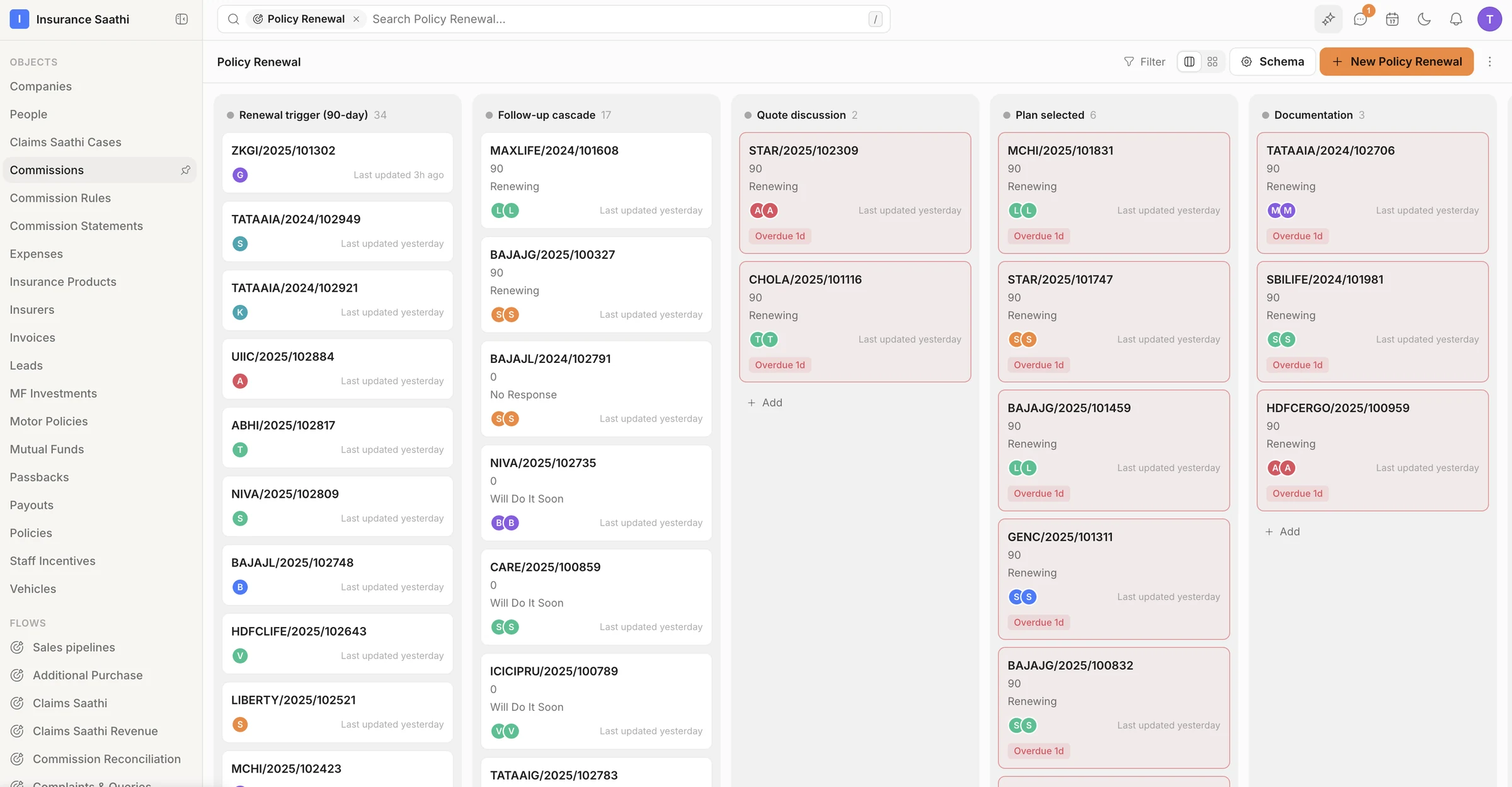
Follow-ups, around the clock.Workflows react to anything in your data — a new lead, a stage change, a renewal date coming up — then create the task, send the message and update the record. Every run is logged.
Dear Ananya, your policy MAXLIFE/2024/101608 expires on 18 Sep. Renew early to keep your benefits.
Delivered · 06:02
Policy Renewal
Renewal triggerFollow-up cascade
A
Ananya Rao
Replied · 9:41
Yes please — can I add my mother to it?
Quote drafted · family floater
Every day · 06:00
Trigger
Renewals due in 90 days
expiry_date = TODAY() + 90
34policies found this morning
Workflow
Renewals — reminder cascade
90 · 60 · 45 · 30 · 15 · 7 days
Active · Healthy
Task created
Call Ananya about her renewal
HighDue 18 SepSSrinivas
Renewal reminder — 90/60/45 daysApproved
Dear Ananya, your policy MAXLIFE/2024/101608 expires on 18 Sep. Renew early to keep your benefits.
Delivered · 06:02
Policy Renewal
Renewal triggerFollow-up cascade
A
Ananya Rao
Replied · 9:41
Yes please — can I add my mother to it?
Quote drafted · family floater
Agents on the night shift.
While you're offline, auto-reply answers the channels you've switched on and agents draft what's next — anything that needs you waits for a yes.
Overnight· 9 actions3 waiting for you
02:14
AI auto-reply
Answered Kabir Mehta on WhatsApp
Replied
02:15
Renewals assistant
Drafted a quote reply for Ananya Rao
Waiting for approvalApprove
06:00
Renewals — reminder cascade
Sent 34 renewal reminders from an approved template
34 sent
06:01
Telecalling — callback due
Created 12 callback tasks
12 tasks
07:30
Claims assistant
Looked up a policy and handed off to a claims executive
Handed off
08:05
Renewals assistant
Spent $0.15 of its $50 budget this month
Within budget
Test it before it goes live.
Dry-run a workflow, watch each step pass, then switch it on. Runs, success rate and failures stay on its overview.
Motor policies — mark Expired after the expiry dateActive
8
Runs · 30 days
100%
Success rate
0
Failed
1.9s
Avg duration
Runs per day
Dry run passed· 5 nodes · 1.9s
07 · Know your numbers
Answers, not spreadsheets.Custom dashboards on your own data — revenue, pipeline, renewals, team performance — pinned for each person. Or ask Molly and get the chart back.
KPIs and funnels for owners, leaderboards for team leads, maps for the field — all built from saved reports.
Bar
Line
Donut
Funnel
Treemap
Sankey
Heatmap
Map
+ KPI, gauge, waterfall, Gantt, chord, sunburst and 26 more
Reports in a click.
AI suggests reports from your data. Keep the useful ones and pin them to a dashboard.
Suggested reportsfrom your schema
Renewals lost by reason
Bar · validated SAQL
Added
Claims by insurer, last 90 days
Treemap · validated SAQL
Commission earned per advisor
Leaderboard · validated SAQL
Molly AI & Agents
Meet Molly. Your AI teammate.
Ask Molly anything about your business and she answers from live data — with a chart, a table or a draft. Ask her to act and she does it: 165 actions across klerc, each change waiting for your confirm.
01
Ask like you'd ask a colleague
Molly knows your records and fields, so a question never needs a query language.
02
She checks the real data
Every answer comes from your live records — and she shows you exactly what she looked at.
03
Answers you can use
A live chart, a table or a file — not a wall of text.
04
She acts — once you say yes
Thirty-four follow-up tasks is one sentence. Nothing changes until you press Confirm.
Molly
Hi, I'm Molly. Ask me to find data, build a chart, or create something.
Which renewals are overdue this week? Group them by owner.
2 tools used
Schema read:Policy Renewal · 14 fields
SOQL query executed:34 rows in 0.4s
34 renewals are overdue. Srinivas and Lakshmi hold half of them — both are over their SLA.
Overdue renewals by owner
BarFunnelPyramid+11 more
SrinivasLakshmiArjunMeeraKabirTanvi
View in app ›
Create a follow-up task for each owner, due tomorrow.
Create 34 tasks?
One per overdue renewal · assigned to the record owner · due tomorrow
ConfirmCancel
34 tasks created· View tasks
Message Molly…
A conversation with Molly. Asked which renewals are overdue this week, grouped by owner, she reads the schema, runs a SOQL query that returns 34 rows, answers in a sentence and shows a bar chart by owner. Asked to create a follow-up task for each, she shows a confirmation card; once confirmed, 34 tasks are created.
Answers with charts
Real questions on your data, answered with live charts, tables and files — 57 chart renderers, not paragraphs.
Does, not just says
165 actions across 19 areas of klerc, within your permissions — and every change waits for your confirm.
Your choice of AI
Run Molly on OpenAI, Anthropic, Google or anything on OpenRouter — chosen per organisation, switchable any time.
AI teammates you configure, not hire.
Give an agent instructions, its own knowledge and a set of tools — plus a monthly budget and an approval queue for anything it wants to do. Try it in a preview chat, then switch it on.
Runs on
OpenAI
Anthropic
Google Gemini
OpenRouter
Bring your own key, or use the included models within fair-use limits.
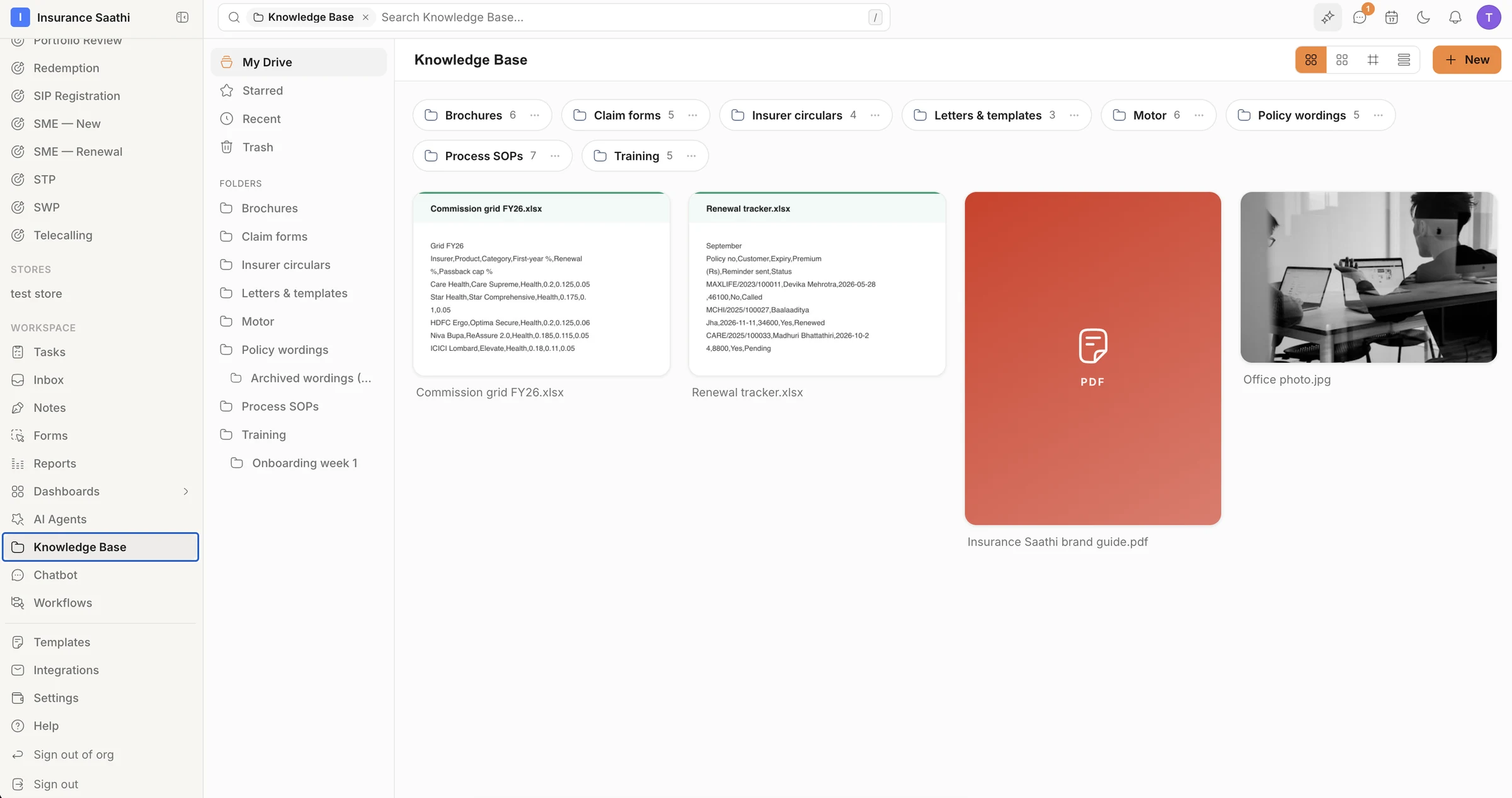
First-year and renewal commission rates for five health insurers, with passback caps per product.
commissionhealthFY2612 chunks · ready
By the numbers
Deep enough to replace the apps you pay for.
field types for your records
28
chart types for dashboards
40+
calendar views
5
message types in the inbox
27
actions Molly can take
165
app integrations
989
spreadsheet functions
237
days of audit history
45
Replace your stack
Swap six apps for one.
The usual set-up is a CRM, a helpdesk, a form builder, a scheduling app, an invoice spreadsheet and a BI licence — each with its own login, its own copy of your clients and its own bill.
Logins
6→1
Client lists
6→1
Permission systems
6→1
CRM
CRM · separate login
Helpdesk
Helpdesk · separate login
Form builder
Form builder · separate login
Scheduling app
Scheduling app · separate login
Invoice sheet
Invoice sheet · separate login
BI seats
BI seats · separate login
klerc
one login · one data model
All of it, in one workspace
CRM on your own records
One inbox for every channel
WhatsApp templates & broadcasts
Forms & chatbots
Calendars & bookings
Pipelines, tasks & notes
Invoices & payment tracking
Workflow automation
Custom dashboards & reports
Six separate app subscriptions stacked on top of each other collapse into a single klerc workspace.
klerc compared with a typical stack of separate tools
What you need
klerc
A typical stack
CRM on your own records
Included
CRM subscription
One inbox for every channel
Included
Helpdesk subscription
WhatsApp templates & broadcasts
Included
WhatsApp broadcast tool
Forms & chatbots
Included
Form and bot builders
Calendars & bookings
Included
Scheduling app
Pipelines, tasks & notes
Included
Project and task tools
Invoices & payment tracking
Included
Invoice spreadsheet
Workflow automation
Included
Automation tool
Custom dashboards & reports
Included
BI seats
AI assistant & agents
Included
Per-app AI add-ons
Docs & spreadsheets
Included
Office suite
Everything on one client record
Built in
Exports, copy-paste & glue
Solutions
Built for businesses that sell a service.
Advisors, clinics, brokers, agencies, consultants — if your work is a pipeline of people and promises, klerc is built for you. Shape your records, connect your channels and run every client from one place.
klerc ships Person and Company. Everything else, you name. A few of the shapes service businesses give it:
Insurance & wealth advisory
Policies
Renewals
Claims
Commissions
Clinics & healthcare
Patients
Appointments
Treatments
Follow-ups
Real estate
Enquiries
Properties
Site visits
Bookings
Education & coaching
Enquiries
Students
Batches
Fees
Legal & professional services
Clients
Matters
Deadlines
Invoices
Agencies & consultancies
Clients
Projects
Retainers
Invoices
Something for everyone at standup
Owners & partners
Advisors & sales
Service & operations
Support leads
Team managers
Developers
Security & IAM
Guardrails for people and agents.
Roles, teams and record-level sharing decide who sees what. Molly works inside the permissions of the person asking; agents inside their tools, budget and approvals. Every login, change and export lands in the audit log.
Role hierarchy
Owner
Head of sales
Advisors · North
Advisors · South
Field-level security
Premium₹18,400
Commission Hidden
OwnerLakshmi
Audit log
append-only · 45 days
Exported 1,240 recordsMeera09:41
Changed Premium 18,000 → 18,400Lakshmi09:38
Denied: Commission (hidden field)API token09:35
Signed in · trusted deviceSrinivas09:30
Roles & teams
Custom roles, teams and a drag-and-drop hierarchy — managers see their team's work automatically.
Record & field security
Share records one by one, and hide or lock sensitive fields like premiums or phone numbers.
Audit log
Logins, record views, changes, exports and admin activity — kept 45 days and exportable to CSV.
Secure sign-in
Two-factor sign-in with trusted devices, and API tokens that can never do more than their owner.
API & Integrations
Everything in the UI is an API.
Connect nearly 1,000 apps — Google Calendar, Stripe, QuickBooks, Slack and more — or build your own on a REST API that runs on the same actions as the app.
terminal
# Create a recordcurl-XPOST https://api.klerc.co/api/v1/objects/$OBJECT_ID/records \-H"Authorization: Bearer wk_live_…" \-d'{"data": {"policy_number": "MAXLIFE/2024/101608"}}'# Or query anything with SOQLcurl-XPOST https://api.klerc.co/api/v1/query \-H"Authorization: Bearer wk_live_…" \-d'{"text": "SELECT insurer, SUM(premium) FROM motor_policy GROUP BY insurer"}'
WhatsApp, email, social DMs, SMS and chat in one inbox
Forms, chatbots, calendars and bookings
Invoices with payment tracking
Custom dashboards and reports
Molly AI and AI agents
Nearly 1,000 app integrations
Teams & migrations
Moving a team off a spreadsheet farm or an eight-app stack? We'll help you shape your records, import your data and connect your channels — live, with the people who built it.
No fake tiers to compare yet — we'd rather earn the pricing page. Meanwhile, everything's included.
Questions
The honest FAQ.
Still curious? A demo is thirty minutes with the people building it. Book a demo or write to support@klerc.co.
What is klerc?
The agentic CRM for service businesses: Molly and your AI agents working on one CRM with every inbox, forms, scheduling, pipelines, tasks and notes, invoices, dashboards and workflows — one workspace, one data model, one login.
What can the AI agents actually do?
An agent gets instructions, its own knowledge, a set of tools and a model. It wakes when something happens, looks things up, drafts messages and creates tasks and records with the tools you give it — inside a monthly budget, with an approval queue for anything that needs a person's OK. Molly, the assistant, answers questions with live charts and asks before every change.
What does early access cost?
Nothing while we onboard early teams. We want feedback and real workloads more than invoices right now.
What happens when pricing launches?
Paid plans will be announced before general availability, and early-access teams will get generous notice and a founding-customer offer before anything changes.
Can I invoice clients from klerc?
Yes. Raise numbered invoices on the client's record, work out tax with a formula, attach the receipt, track payment status and let a workflow send payment reminders. Payment and accounting apps like Stripe, Razorpay, QuickBooks and Xero connect through integrations.
Can I book appointments in klerc?
Yes. Set up bookable services with open time slots and book clients into them, keep consultations, visits and team meetings on shared calendars, and add a meeting link for video calls. Already on Calendly or Cal.com? Connect them through integrations.
Is there a client portal?
It's coming soon: a login for your clients to see their records, appointments, invoices and documents, and message your team. Book a demo if you'd like to help shape it.
Which channels can I connect?
In the inbox: WhatsApp, Gmail, Outlook and Zoho Mail, Instagram and Facebook, X and YouTube, Slack and Microsoft Teams, SMS through Twilio, and your own website chatbot. Beyond the inbox, nearly 1,000 apps connect through integrations — calendars like Google Calendar and Calendly, payments like Stripe and Razorpay, accounting, e-signature, docs and more. A few channels depend on third-party app review — that's a platform queue, not a paywall.
Is klerc only for insurance?
No. Our demo workspace runs an insurance and wealth brokerage — policies, renewals, claims, commissions — because it's a demanding service business. You design your own records and pipelines, so clinics, real-estate teams, agencies, consultancies and coaching businesses shape it the same way.
Which AI models does Molly use?
Your choice of OpenAI, Anthropic, Google or OpenRouter, picked per organisation. During early access model usage is included within fair-use limits, and bring-your-own-key is supported. Every write Molly proposes waits for your confirm, and AI agents run on a monthly budget with an approval queue.
Can I export my data if I leave?
Yes. Records export to CSV with labels or IDs, and the REST API gives you programmatic access to everything you've stored.
Do you help with migration?
Yes — book a demo and we'll help you shape your records, import your data and connect your channels.
Put your agents to work.
Bring your team, connect your channels and let klerc take the follow-ups — from first hello to paid invoice.